Over the past year, I sold, retired, or otherwise got rid of more than 30 Prusa 3D printers. All machines I paid full price for, by the way. Then I replaced them with Bambu Lab printers.
One year and more than 100,000 combined print hours later, would I make the same decision?
Yes. But that answer comes with some asterisks.
The output has been fantastic, the hardware has held up surprisingly well, and the concerns I had about carbon rods and repairability mostly haven't materialized. On the other hand, I've dealt with crashes, ruined microSD cards, frozen prints, and a few machines with genuinely bizarre behavior.
This is my experience running these printers as production equipment, not occasionally making something for my desk. Bambu Lab did not sponsor this test. The point is to separate what actually holds up from what still needs work.
Key Takeaways
- More than 100,000 combined fleet hours supported my decision to replace Prusa machines with Bambu Lab.
- Carbon rods and print quality held up, while mechanical repairs were limited and generally straightforward.
- Bed adhesion caused most failed prints, with occasional collisions and startup Z-offset errors adding trouble.
- Recurring microSD failures and unexplained freezes remained the biggest unresolved concerns in production.
Table of Contents
- How My Print Farm Went From Prusa to Bambu Lab
- What 100,000 Hours Does and Doesn't Tell Us
- Four Bambu Lab Concerns That Didn't Match My Experience
- Print Failures: Bed Adhesion Still Runs the Show
- Hardware Failures Were Surprisingly Limited
- Software and Storage Are Where Things Get Weird
- Please Give Us a Better Filament-Change Workflow
- Maintenance: They Survived More Neglect Than They Should Have
- Would I Switch From Prusa to Bambu Lab Again?
- The Storefront Behind the Print Farm
How My Print Farm Went From Prusa to Bambu Lab
I started building my print farm in 2019, when Prusa was the obvious choice for reliable production printing. Eventually, I had about 40 Prusa machines.
But I also started using a Bambu Lab X1 Carbon in my office for prototyping, and frankly, I loved it. Don't tell Josef.
When it came time to expand, I wanted a data-based decision. Mechanical engineer problems. An initial comparison between Prusa and Bambu Lab led me to buy nine P1P printers. From there, the transition snowballed into a fleet of roughly 50 Bambu Lab machines, with a couple of Prusas still hanging around.
For subsequent purchases, I switched to the slightly fancier P1S. The enclosure makes for a cleaner setup, and I like having the cable chain included.
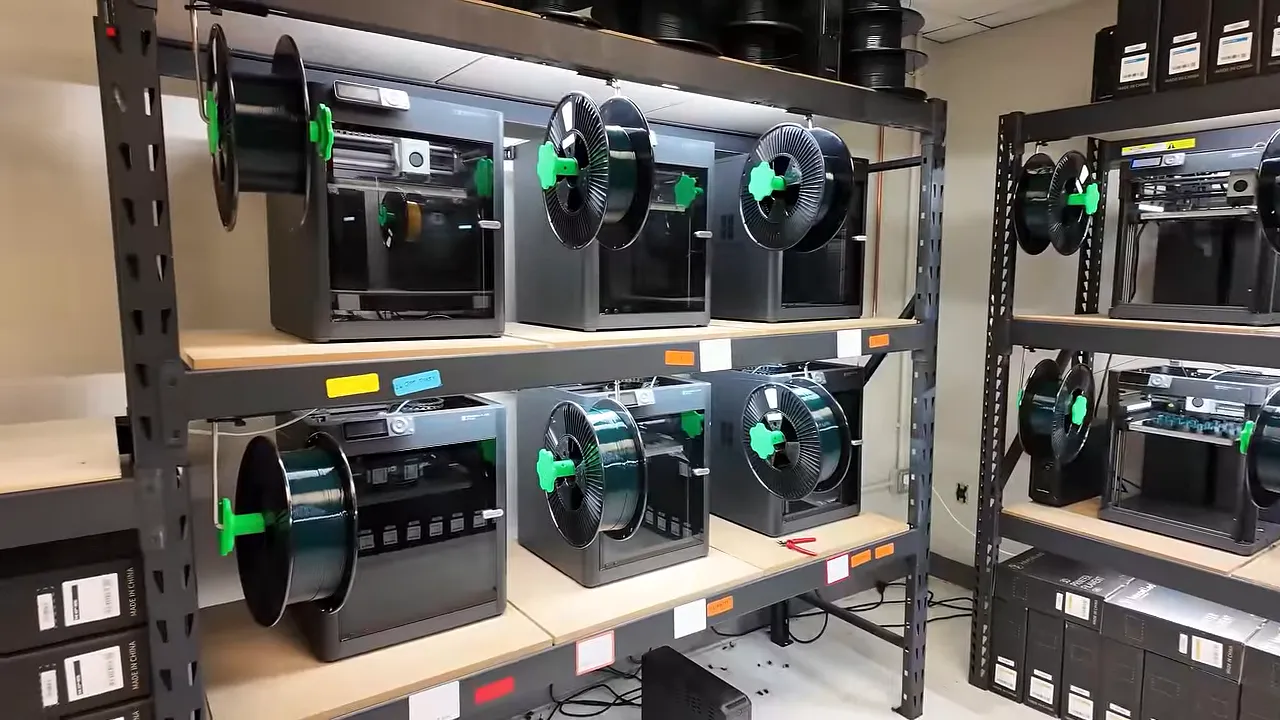
The new setup more than doubled production output in the original room, with another bank of 12 printers adding capacity elsewhere.
I'd love to claim I waited for a complete year of empirical evidence before committing. I didn't. I had enough information to feel good about the direction, but the business couldn't wait a year for me to finish collecting data. There was still a leap of faith involved.
I Want an Appliance, Not Another Hobby
One of Bambu Lab's biggest accomplishments was making a 3D printer feel more like an appliance and less like a science experiment.
If you love tinkering with printers as much as you love printing things, that's completely valid. There's room for that. It just isn't what I need in a manufacturing cell.
For my business, the machines are tools. Consistent, high-quality output is the goal. Less time adjusting a printer means more time producing parts.
What 100,000 Hours Does and Doesn't Tell Us
The headline number is combined fleet time. It is not one printer surviving 100,000 hours.
That total is equivalent to one machine running continuously for about 11.5 years, but dozens of printers operating in parallel are not the same thing as one machine aging for a decade. Some of my higher-hour machines had around 4,000 hours on them at this point.
There's another important limitation: I did not document every failure against a serial number and exact operating hour. I paid close attention to recurring problems, but I cannot give you a defensible annual failure percentage or a precise lifetime curve.
My initial comparison showed a much lower scrap rate on the P1P than on the Prusa models I tested. The concern was whether that advantage would survive the honeymoon phase.
Reliability engineers describe a typical lifecycle using the bathtub curve: early manufacturing defects, a relatively stable useful-life period, and eventually increasing failures as equipment wears out. A printer working beautifully when new doesn't tell you everything about how it will behave in production.
What follows is a year of practical experience with that question, including the problems I still haven't fully explained.
Four Bambu Lab Concerns That Didn't Match My Experience
1. The Company Was Too New to Trust
Early on, it was reasonable to ask whether Bambu Lab would stick around. Prusa had a much longer track record, while Bambu Lab was a newcomer with an ecosystem that leaned heavily on connected features.
After seeing Bambu Lab grow into a major consumer 3D printing company, backed by people with experience at companies such as DJI, I became much less concerned about its staying power.
That isn't a guarantee about any company's future. It simply stopped being a deciding objection for my purchases.
2. The Printers Would Be Impossible to Repair
My maintenance experience hasn't supported that concern. For the mechanical repairs I've needed, replacement parts have been available, and most orders arrived within a couple of days.
I now keep a substantial spare-parts inventory, which gives me confidence that I can keep the fleet running.
Prusa still deserves credit for setting a high bar in documentation, standardized parts, and open-source design. Those things make maintenance approachable. But a repair being well documented doesn't make doing it repeatedly any more fun.
In practice, the Bambu Lab hardware has been serviceable without demanding constant attention.
3. The Carbon Rods Would Be a Reliability Disaster
As a mechanical engineer with maintenance and reliability experience, I was skeptical when I first saw the carbon-rod X-axis motion system.
After a year, I've had zero carbon-rod issues across the fleet. An employee even mistakenly greased one set, and that printer was still running fine. That is an anecdote, not a maintenance recommendation.
The rods obviously have a finite life. I just haven't found it yet. Complete replacement assemblies are available, and I keep a couple ready for when that day arrives.
4. High Speed Would Ruin Print Quality Over Time
I haven't seen a relationship between machine age and declining print quality. Parts coming off my roughly 4,000-hour machines look like parts coming off brand-new machines.
The textured PEI sheets do wear and need replacement. That's a consumable doing consumable things.
I also use hardened steel nozzles, and I hadn't needed to replace them for wear during this period.
Print Failures: Bed Adhesion Still Runs the Show
By far, the most common cause of failed prints was poor bed adhesion. That part of 3D printing hasn't magically disappeared.
One particularly impressive mess was entirely our fault: parts were sliced using PLA settings, then printed in PETG. Naturally, I started the jobs right before leaving for the day.
The next morning was fun.
That isn't a printer reliability problem. It's a process mistake. But there were two recurring print-failure behaviors where the machines themselves deserve criticism.
Crashes Can Escalate Before the Printer Stops
The printers haven't been especially good at detecting collisions in my experience. A part can come loose, get in the toolhead's way, and start a chain reaction.
I've had collisions pull off the front fan housing. The printer should stop when it detects that housing is disconnected, but sometimes the damage has already happened and the housing needs replacement.
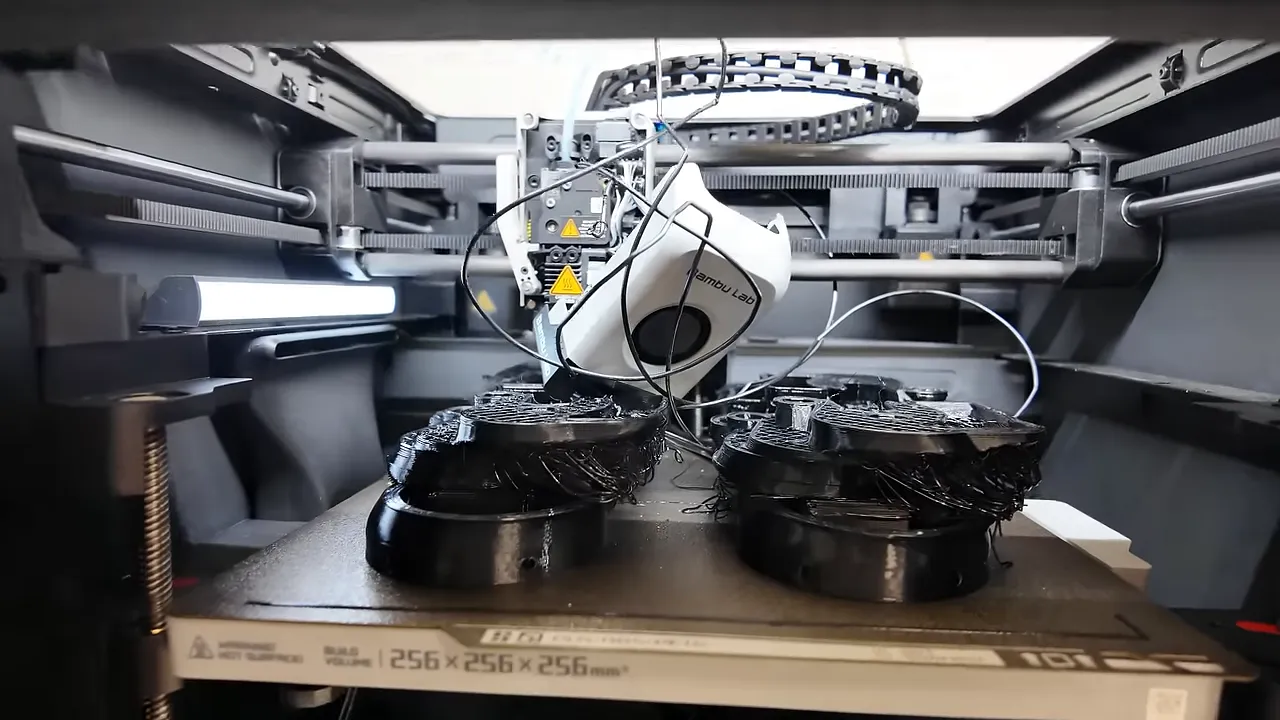
My suspicion was that collision detection sensitivity could be improved, but I didn't establish the underlying control-system cause. The practical observation is simpler: these machines sometimes keep going when I'd really prefer they didn't.
Occasional Incorrect Z-Offset at Startup
A much rarer issue is an incorrect Z-offset during the startup routine.
From what I could tell, a little filament remained on the nozzle and interfered when the nozzle touched the print sheet to establish its position. The startup purges and wipes are supposed to prevent that, but occasionally they didn't.
I encountered the same general failure mode much more frequently on the Prusa MK4 machines in my original comparison, where nozzle cleaning required more intervention.
Across the Bambu Lab fleet, I could count these incidents on one or two hands. Uncommon, yes. Worth knowing about, also yes.
The takeaway is pretty familiar: reliable first-layer adhesion remains central to print success, even with a highly automated printer.
Hardware Failures Were Surprisingly Limited
Considering the workload, the hardware failure list is short.
Two Extruder Failures
I had two extruders fail:
- One had a section of teeth stripped off the yellow gear.
- The other wouldn't feed filament, even with the hotend removed, despite the gear appearing intact.
I don't have a satisfying explanation for either failure. The good news is that the extruder is a compact replacement assembly. The swaps took me roughly two minutes, and replacements were about $35 at the time.
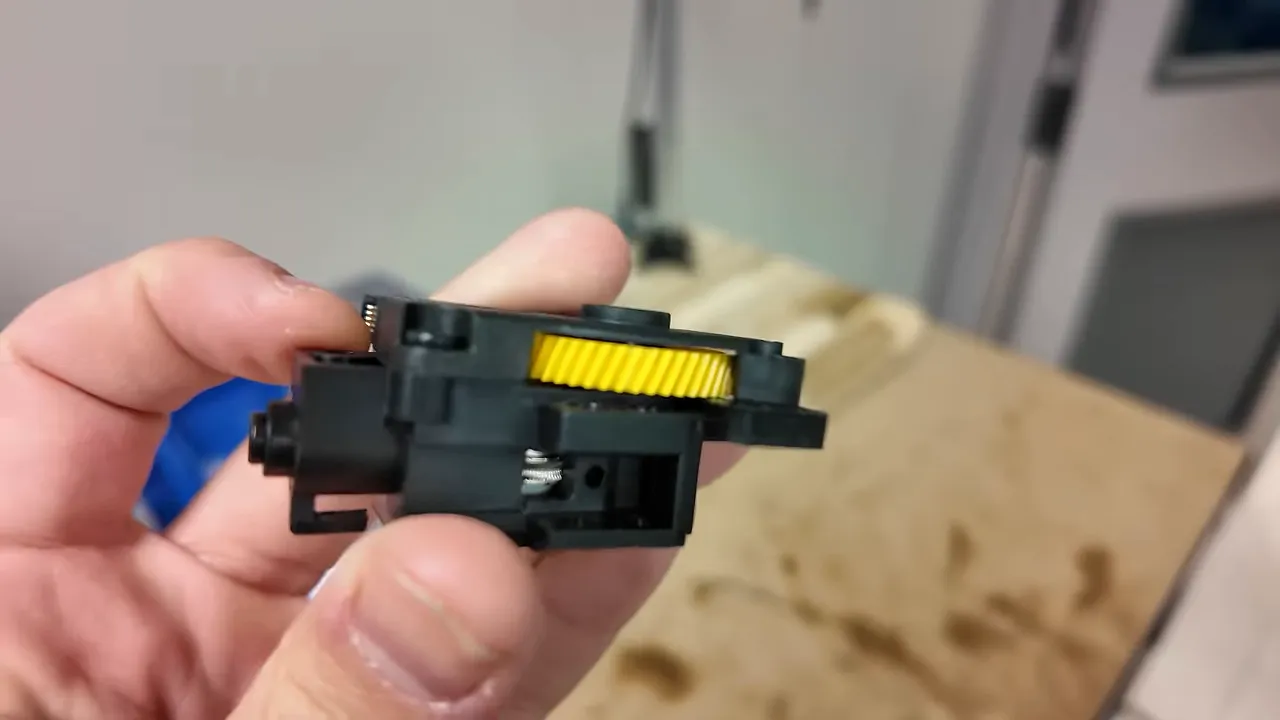
A strange failure is much less painful when the fix is inexpensive and quick.
A Worn PTFE Tube and a Dull Cutter Blade
The remaining hardware problems were wear items:
- One PTFE tube wore out, causing filament to hang up during loading.
- One filament cutter blade became dull, causing snags during unloading that needed manual release.
The printers came with spare tubing and cutter blades, so those repairs cost me nothing extra in parts.
Compared with my experience maintaining the Prusa MK3S+ fleet, this was a welcome change. Over a similar stretch of production, I would have expected multiple thermistor issues and probably at least one complete hotend replacement, generally at a higher repair cost.
Software and Storage Are Where Things Get Weird
The mechanical reliability has impressed me. The software and electronics side is where I have more questions.
For context, the older Prusas used simple 8-bit controllers and basic displays. They generally worked, apart from the occasional screen full of nonsense characters or an upside-down display that a reset would clear. The newer 32-bit Prusa machines added color screens and seemed similarly dependable in my use.
The Bambu Lab P1 interface is also pretty basic compared with the X1 models, and several issues in my fleet went beyond an annoying screen.
One Printer Lost Wireless Communication
One machine lost both Wi-Fi and Bluetooth functionality.
That left me unable to send files remotely, troubleshoot through the app, or update it through my normal connected workflow. It may have been an isolated fault, but it was a bizarre one.
A Handful of Mid-Print Freezes
I've found printers frozen with the toolhead parked at the back or with the nozzle stuck against the part midway through a job.
In these cases:
- The nozzle and bed remained hot.
- The cooling fans continued running.
- The print wouldn't resume.
- Stopping the job meant sacrificing the parts.
This happened a handful of times, mostly on my oldest, highest-hour P1Ps. However, I also saw it on a brand-new P1S, so age alone doesn't explain it.
One important detail: the farm runs its jobs from microSD cards, with prints started locally.
Corrupted MicroSD Cards Were the Most Annoying Repeat Problem
This was the recurring issue that really got my attention.
My usual setup was to load production files onto a printer's card, calibrate the machine, and put it to work. For weeks, everything could run normally: start a job, remove the parts, repeat.
Then, out of nowhere, the printer would report that the card's format wasn't supported. The computer couldn't read it either. Attempts to erase or reformat the affected cards didn't recover them.
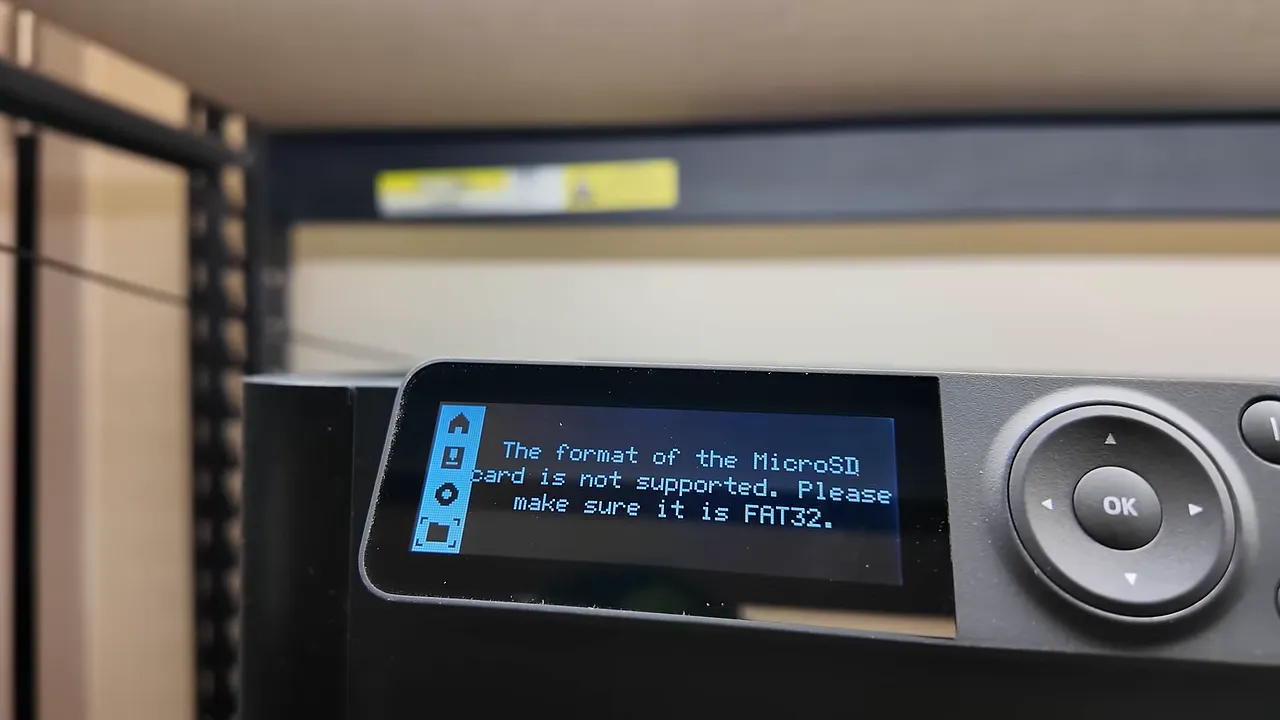
This happened at least a dozen times, across different printers of different ages. Enough that spare microSD cards became a regular part of my inventory.
There is a handling requirement here that's easy to miss: the card slot is marked cold-swappable. You should turn the printer off or properly eject the card before removing it.
I wasn't diligent enough about that in the beginning. I'll own that. But even after I changed my handling, upgraded from the supplied cards, and started formatting cards inside the printer as Bambu Lab recommended, the issue still occurred occasionally.
The printer's SD Card menu includes both Format and Eject options, which are useful to know about.
I contacted Bambu Lab. They reiterated the formatting and ejection guidance and sent replacement AP boards to test. At this point, I didn't have a confirmed fix.
One possible explanation was wear from repeated writes associated with the printer's use of the card as a cache. That's a hypothesis, not a diagnosis. I can't tell you whether the root cause was the card, the board, firmware, or some combination.
I hadn't encountered this problem on either of my X1 machines, but those saw much lighter use and generally received jobs remotely. That isn't a controlled comparison.
Some Older Machines Wouldn't Start Jobs
A related-looking problem appeared on some of the oldest printers. I'd select a file and start the job, the printer would appear to begin warming up, and then it would abruptly quit and return to the home screen.
Repeating the process or restarting sometimes helped. At first, shorter jobs seemed more likely to start. Eventually, one machine wouldn't even start those.
Again, I suspected a connection with the storage problems, but I hadn't proven it. These unresolved faults are the biggest asterisk on an otherwise strong production experience.
Please Give Us a Better Filament-Change Workflow
Not every problem scraps a print. Some just waste a little time, over and over, until they become a surprisingly large annoyance.
Changing a spool through the P1 menu takes too many steps. My demonstration reached 17 button clicks.
A straightforward Change Filament option would be a meaningful improvement. Prusa handled this workflow better in my experience.
On one desk printer, that's a minor complaint. Across 50 machines with frequent spool changes, interface friction becomes an operating cost.
Maintenance: They Survived More Neglect Than They Should Have
Given my background in maintenance and reliability, this part is a little embarrassing.
I hadn't done much preventive maintenance.
That says something good about the printers' resilience, but it isn't a maintenance strategy I'd recommend copying. Here were the recommendations I was working from, alongside what I actually did:
- Carbon rods: Check and clean monthly. I hadn't been doing it.
- Z-axis lead screws: Grease every three months. I was closer to every six months.
- Y-axis and Z-axis linear rods: Check and clean monthly. Also neglected.
- Extruder gears: Clean out dust monthly. I hadn't done that either, and given the extruder failures, it deserved attention.
- Filament cutter: Inspect for dullness and replace as needed. The guidance I cited called for checking every five spools when using PETG.
- Idler pulleys: Apply oil when they start squeaking. I hadn't noticed much squeaking.
- Part-cooling fans: Check weekly for dust and debris. That wasn't happening.
- Nozzle wiper: Periodically inspect for wear and replace when necessary. Another item I needed to start checking.
- PTFE tubing: Inspect for wear and replace as needed, with checks every 10 spools for normal filament in the guidance I cited.
Use the manufacturer's maintenance instructions for the correct procedures rather than treating my confession as a service manual.
All joking aside, I was putting together a proper maintenance program for the fleet. The goal wasn't just to prevent downtime. It was also to record problems consistently so future decisions could rely on better information.
There's a big difference between “I remember replacing a couple of these” and knowing exactly which machine needed what repair at which operating hour.
Would I Switch From Prusa to Bambu Lab Again?
Absolutely.
For my print farm, the combination of increased output, strong overall reliability, and a lower purchase price made the move worthwhile. The hardware problems were fewer and generally easier to deal with than I expected.
That doesn't make the software issues imaginary. Corrupted storage, unexplained freezes, and machines refusing to start jobs matter, especially when production depends on them.
If you run one printer occasionally, you may never encounter most of these problems. My fleet effectively spent a year in a production torture test. That makes it useful for finding recurring issues, but it doesn't mean every owner should expect the same repair list.
My conclusion is simple: these have been excellent production tools, not flawless ones. I would make the transition again, and Bambu Lab remained my choice as I continued expanding.
The Storefront Behind the Print Farm
Shopify sponsored the original project, and it's also the platform I use to run the sales side of this business. More printer output only helps if you have a practical way to sell what you're making.
Three things have been especially useful for us:
- A broad support ecosystem: There are plenty of third-party apps and skilled people available when we need help.
- Physical and digital products together: We sell printed products, digital build plans, and print-it-yourself kits, with the ability to combine physical and digital items in one listing.
- Room to grow: It's approachable to start with, while features such as Managed Markets support expansion into international selling.
Digital products have been a meaningful part of our business because, once created, they don't require another physical unit of inventory for each sale. If you've been sitting on an online business idea, Shopify is the platform I'd encourage you to explore.


